


Do you have a lot of photos on Facebook and want to delete them all at once? Deleting photos one by one can be time-consuming and frustrating, but fortunately, there is a way to delete all your Facebook photos at once. In this article, we’ll show you how to do it.
Facebook has become an integral part of our lives where we share and store countless memories in the form of photos.
However, as time goes by, these memories can become cluttered, and it can be overwhelming to navigate through a sea of photos to find what we’re looking for.
Can I hide my Facebook photos without deleting them?
Yes, you can hide your Facebook photos by choosing who to hide them from. You can hide them either from the general public or your Facebook friends.
You can hide specific embarrassing photos you don’t want your friends to see from your profile timeline
How To Delete All Your Facebook Photos At Once On Mobile
- The first thing you need to go to is your Facebook feed and click on the navigation icon. The three lines below the Messenger icon.

On your Menu dashboard, click on your profile picture to go to your profile dashboard.

- Tap on the three dots below the Add to Story button.

- Once you are on your profile settings, click on “Activity Log”
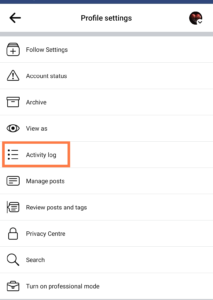
- Click on Manage your posts.
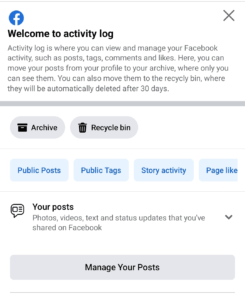
To avoid deleting all your Facebook posts. Select the filter, and click on categories. Then, click on the photos and videos to proceed.

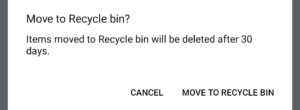
- If you want to delete all photos and videos, check the All box to select the photos and videos. Now click on Recycle Bin

How To Delete All Photos On Facebook Web Using PC
- Go tob facebook official webpage. Login your account with your PC
- Click on your profile picture at the top right corner
- Tap Settings & privacy
- Select Activity Log
- Tap Your posts to show drop-down menu.
- Select Photos and videos
- Tap the All box to select all photos and videos. If you want to delete only photos select the photos only.
- Tap the Trash button and confirm you want to delete the photos. Tap Move to trash.
Can I recover my photos after deleting them?
You can recover your deleted photos and videos on Facebook within a period of 30 days after you have deleted them.
What happens when all my photos are deleted on Facebook?
If you delete your account, the system will remove all your comments and likes. The system will move your photos and videos to the recycle bin and will automatically delete them from the recycle bin after 30 days if you don’t recover them within that time frame.
The system will also remove all tags and mentions in your photos and videos.
Conclusion
You can easily delete all your Facebook photos and videos at once by following the simple steps in this article. Regularly decluttering your Facebook profile can make it easier to navigate and free up storage space.
