

In this article, you’ll learn how to remove someone from your best friends list on Snapchat.
You can remove someone from your Snapchat best friends list by limiting your interactions with the person, removing them as friends, or blocking them.
Snapchat is a popular social media platform that lets users share photos and short videos as snaps.
Snapchat has some special features on the platform and the best friends list feature is one of them. The best friends feature shows a list of the people you interact with the most on Snapchat.
However, you may want to remove someone from your best friends list but don’t know how to go about it. Well, this article guide is your guide.
In this article, you’ll learn how to remove someone from your best friends list on Snapchat.
Why Is Someone I Don’t Snap On My Best Friends List?
If you see someone you hardly send snaps to suddenly appear on your best friends list. This is because you reply to their snaps and chats fairly. Replying to the person can increase their chances of becoming your best friend.
However, this might also be a technical issue with the app if you and the person hardly snap or chat with each other.
How To Remove Someone From Your Best Friends List
You can remove someone from your best friends list on Snapchat by decreasing your interactions with the person and increasing your interactions with other people.
Limiting your interaction with someone you frequently chat with will remove the person from your Best Friends list and replace them with the people you chat with the most.
However, there are other alternatives such as removing them as friends or blocking them.
Keep in mind that once you remove someone as friends or block them, you will lose the snapstreak you have with them. Also, the person will be removed from your friends list and your chat screen.
However, if you choose to be friends with the person again, you’ll need to unblock the person and add them back as friends. If you don’t want the person to appear on your best friends list, then you have to limit your interactions with the person.
Limit Interaction With The Person
You can remove or replace someone from your best friends list by limiting your interactions with them and increasing your interactions with the people you want to take their place.
The best friends list is based on the people you interact with the most. So, limiting your interaction with someone won’t automatically remove them as friends.
They will be slowly replaced and Snapchat will remove them from your best friends list.
Remove The Person As Friends
Here is how you can remove someone as your friend on Snapchat.
- Open the Snapchat app and go to the Chat Section.
- Press and hold the name of the person.
- Tap Manage Friendship
- Select Remove as Friend
- Confirm and tap Remove.
Block The Person
To block someone on Snapchat, do this:
- Launch the Snapchat app
- Tap the Message Icon at the bottom of the screen.
- On the chat screen, look for the name of the person you want to block. Press hold the name of the person.
- Select Manage Friendship.
- Select Block.
- Confirm you want to block this person. Tap Block again.
What Happens When You Remove Someone From Your Best Friends List?
If you remove someone from your best friends list, they will be removed from your Send To Screen and the chat section of your profile.
You’ll also lose the snapstreak streaks you have with them. The Snapchat special best friends emoji next to the person’s name will be removed.
How to Hide Best Friends on Snapchat
You can hide or disguise your best friends list and assign different personalized emojis to replace the default friendship emojis.
This will remove the original best friends emojis and if someone picks your phone and opens Snapchat on your phone, they won’t be able to know who your best friends are.
- Launch the Snapchat app
- Tap your Snapchat Bitmoji avatar icon at the top left corner.
- Tap the Settings Icon at the top right corner of your profile dashboard.
- Scroll down to “privacy control”, and select Customize Emojis.
- Select your Friendship emoji level and choose your preferred new emoji. Tap on the new emoji to change Snapchat best friends emojis.
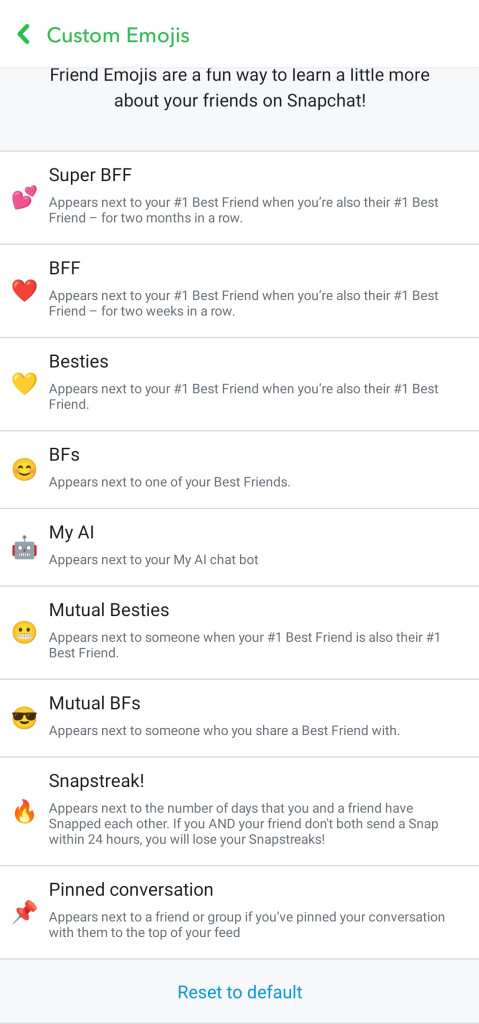
You can restore the default friendship emoji at any time. To do this,
- Go back to settings and tap Customize Emojis
- Tap Reset To Default at the bottom of the screen to restore the original friendship emojis.
How Many Best Friends Can You Have On Snapchat?
Snapchat best friends list is determined by the people you interact with the most.
However, there’s a limit to the number of people you can have on your best friends list. Currently, Snapchat users can only have eight (8) best friends.
Conclusion
There you have it! You can remove someone from your best friends list on Snapchat by reducing your interactions with the person.
Snapchat best friends list is updated regularly. So, if you limit your interactions with someone, they will go down and eventually be replaced by your new best friends.
Also, removing someone as friends or blocking them, will remove them from your best friends list on Snapchat.
Frequently Asked Questions
Can you remove someone from your best friends list on Snapchat without blocking them?
Yes, you can remove someone from your best friends list without blocking them by limiting your interactions with the person. However, if you don’t want to lose your snapstreak with the person, you can send a few snaps daily to keep the snapstreak going.
How long do best friends last on Snapchat?
Best friends list are updated regularly. You can be best friends for as long as you can, so far you interact with each other frequently.
Does Snapchat remove someone from your best friends list if you don’t Snap them for a week?
Yes, if you don’t interact with someone on your best friends list for some time, Snapchat will remove them from your best friends list.
If you interact with other people more often, the person you no longer snap will be replaced from your best friends list.
FURTHER READING
- Can You Become Snapchat Best Friends Through Chat?
- How to Become Best Friends On Snapchat
- How To Restore Your Snapstreak On Snapchat
