Close Menu
  • Social Media
    • Facebook
    • Instagram
    • Snapchat
    • TikTok
    • X (Twitter)
  • Messaging
    • Kik
    • Messenger
    • Telegram
    • WhatsApp
  • Android
  • Browsers
Facebook X (Twitter) Instagram
TechfybaTechfyba
  • Social Media
    • Facebook
    • Instagram
    • Snapchat
    • TikTok
    • X (Twitter)
  • Messaging
    • Kik
    • Messenger
    • Telegram
    • WhatsApp
  • Android
  • Browsers
TechfybaTechfyba
Home » How To Unblock Someone On Instagram
Instagram

How To Unblock Someone On Instagram

In this article, we will walk you through on how you can unblock someone on Instagram in just a few simple steps.
Khael EkeBy Khael EkeUpdated:29 May 20232 Mins Read
Facebook Twitter Pinterest Telegram LinkedIn Tumblr WhatsApp Email
How To Unblock Someone On Instagram
Share
Facebook Twitter LinkedIn Pinterest Telegram Email

Instagram allows its users to block other accounts for various reasons such as unwanted messages, harassment, or simply not wanting to interact with someone anymore. However, situations may arise where a user wants to unblock a previously blocked account to restore communication or allow access to their profile. Thankfully, unblocking someone on Instagram is a relatively easy process that can be done within a few taps, and we’re going to show you how to do it step by step in this article. 

Table of Contents

Toggle
  • How to unblock someone on Instagram
    • STEP 1: Locate and Open Instagram
    • STEP 2: Settings
    • STEP 3: Privacy
    • STEP 4: Unblock Accounts
  • What Happens when you blocked someone on Instagram
  • Conclusion

How to unblock someone on Instagram

Before we proceed, let me give you a Tip in regarding unblocking people on Instagram. You can relatively unblock someone on Instagram on Facebook Messenger if the Instagram account is linked to your Facebook account. But can’t unblock someone you blocked on Facebook Messenger through Instagram. 

STEP 1: Locate and Open Instagram

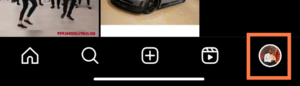
Navigate through your phone apps and look for the Instagram app and open it. Then click on the PROFILE IMAGE to show your profile dashboard.
unblock someone on Instagram

STEP 2: Settings

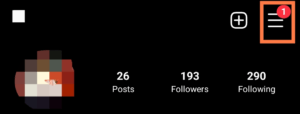
Click on the menu bar icon. And then, click on SETTINGS.
Settings
unblock someone on Instagram

STEP 3: Privacy

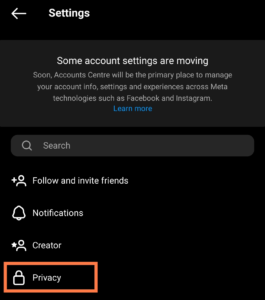
Under the settings scroll down and click the Privacy option. Now navigate down, and you’ll see Blocked Accounts under the connection category.
Privacy

STEP 4: Unblock Accounts

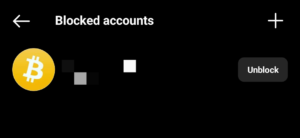
Click on the Blocked accounts to open it. You will see the list of blocked accounts. All you need to do is to tap on the blocked accounts you want to unblock and start unblocking them. 
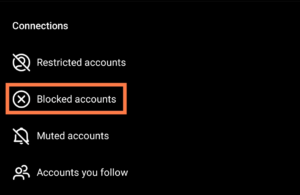
Unblock Accounts
How to unblock someone on Instagram

What Happens when you blocked someone on Instagram

If you block someone on Instagram, please bear in mind that all their likes, comments on your post, and videos will be removed and won’t be restored if you unblock them.

Conclusion

This article shows you how to easily unblock someone on Instagram in just a few steps. Sometimes, you might want to restore communication or allow access to your profile after previously blocking someone. It’s a simple process that involves going to your Instagram settings, finding the list of the blocked accounts, and unblocking the accounts you want. By following the instructions outlined in this article, users can easily unblock accounts on Instagram.

Was this article helpful?
YesNo
Facebook Instagram Messenger Social Media
Share. Facebook Twitter Pinterest LinkedIn Tumblr Email
Khael Eke
  • Website
  • X (Twitter)
  • Instagram
  • LinkedIn

Khael Eke is an experienced writer and blogger in the field of consumer technology with over 4 years of hands-on experience. He has been an editor at Techfyba.com from the outset and his focus and key interests are Android, Xiaomi products, Social Media applications, iOS and accessibility as well as consumer technology in general. Mike's articles will provide you with the practical solutions, knowledge and tools you need to stay ahead in the ever-evolving world of technology.

RECOMMEDNED

Switch From TikTok Personal To Business Account In 2026

0

How To Add A Linktree Link To TikTok 2026

What Does “TY” Mean On Snapchat?

Latest News

Switch From TikTok Personal To Business Account In 2026

How To Add A Linktree Link To TikTok 2026

What Does “TY” Mean On Snapchat?

How To Hide Followers And Following on Instagram 2025 (3 Ways To Do It)

Facebook X (Twitter) Instagram Pinterest
  • About Us
  • Contact Us
  • Privacy Policy
  • Terms and Conditions
  • Cookie Policy
© 2026 Techfyba. All right reserved.

Type above and press Enter to search. Press Esc to cancel.