


This article covers everything on how to change Bitmoji gender on Snapchat. You can change your Bitmoji gender on Snapchat if you mistakenly created the Bitmoji with the wrong gender or you have your reason why you want to change your Bitmoji gender.
Bitmojis are cool features that help you create a customizable avatar of yourself with tons of add-on features.
In this article, you will learn how to change Bitmoji gender on Snapchat and Bitmoji app.
What is a Bitmoji?
Bitmoji is your personalized emoji. Bitmoji allows you to create a customizable cartoon avatar of yourself to represent you on Snapchat and other social network platforms.
See Bitmoji as an anime representation to create an identical version of yourself.
Bitmoji was first introduced by Bitstrips and was later acquired by Snap Inc., since then, Bitmoji has become the representation on Snapchat.
Bitmoji has integrated with other social media platforms such as Facebook, WhatsApp, and iMessage.
Also Read: How To Move Snaps To “My Eyes Only” on Snapchat
How To Change Bitmoji Gender On Snapchat
So if you have decided to change your Bitmoji gender or you’re curious to know if it is possible to change your Bitmoji gender on Snapchat.
Yes, it’s possible, but you have to unlink the current gender and create a Bitmoji with your preferred gender.
Here’s how to change your Bitmoji gender:
- Open the Snapchat app on your phone
- Tap your Snapchat Bitmoji icon
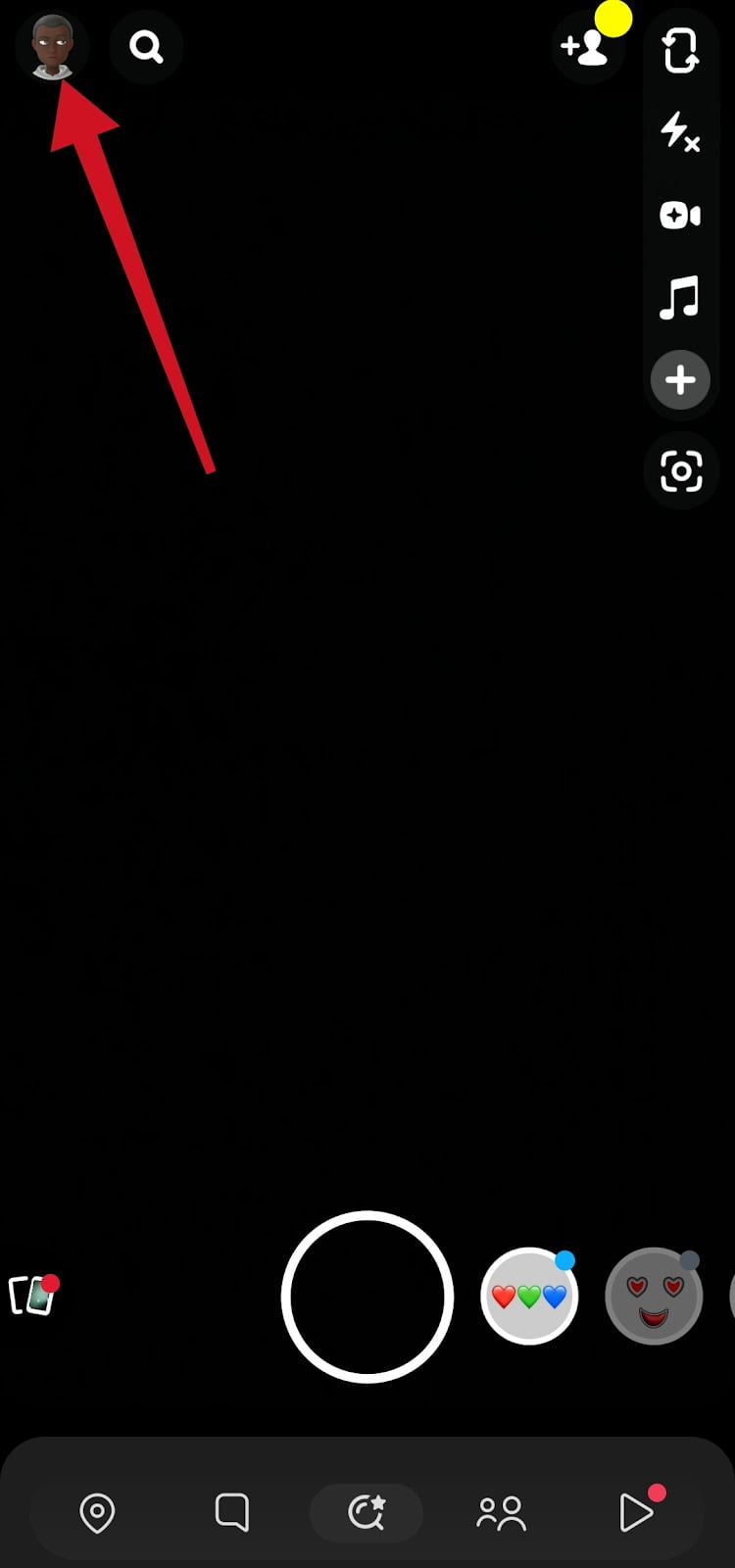
- Tap Settings, the gear icon top right corner of the screen.

- Scroll down and tap Bitmoji right under the notification settings.
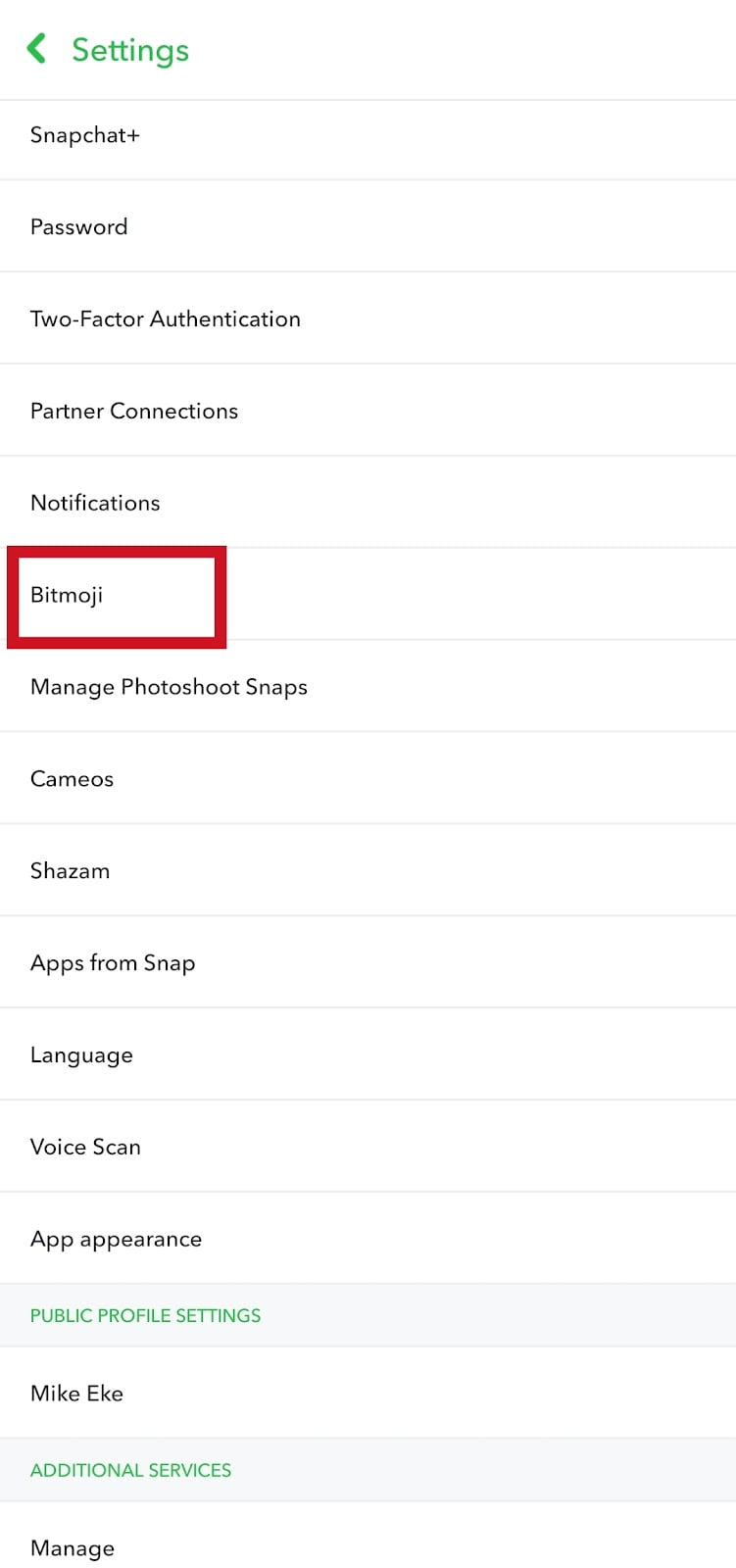
- Tap Unlink My Bitmoji
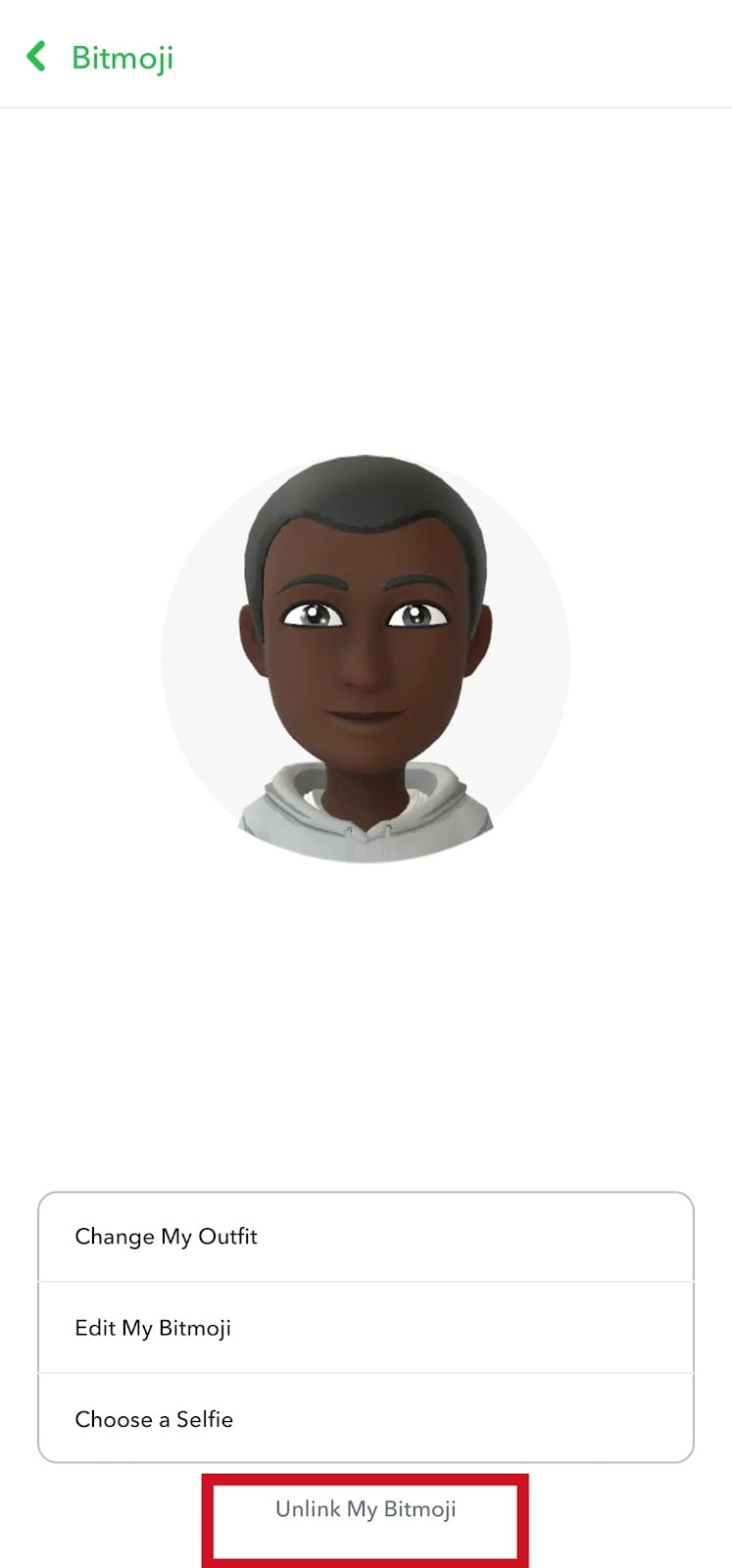
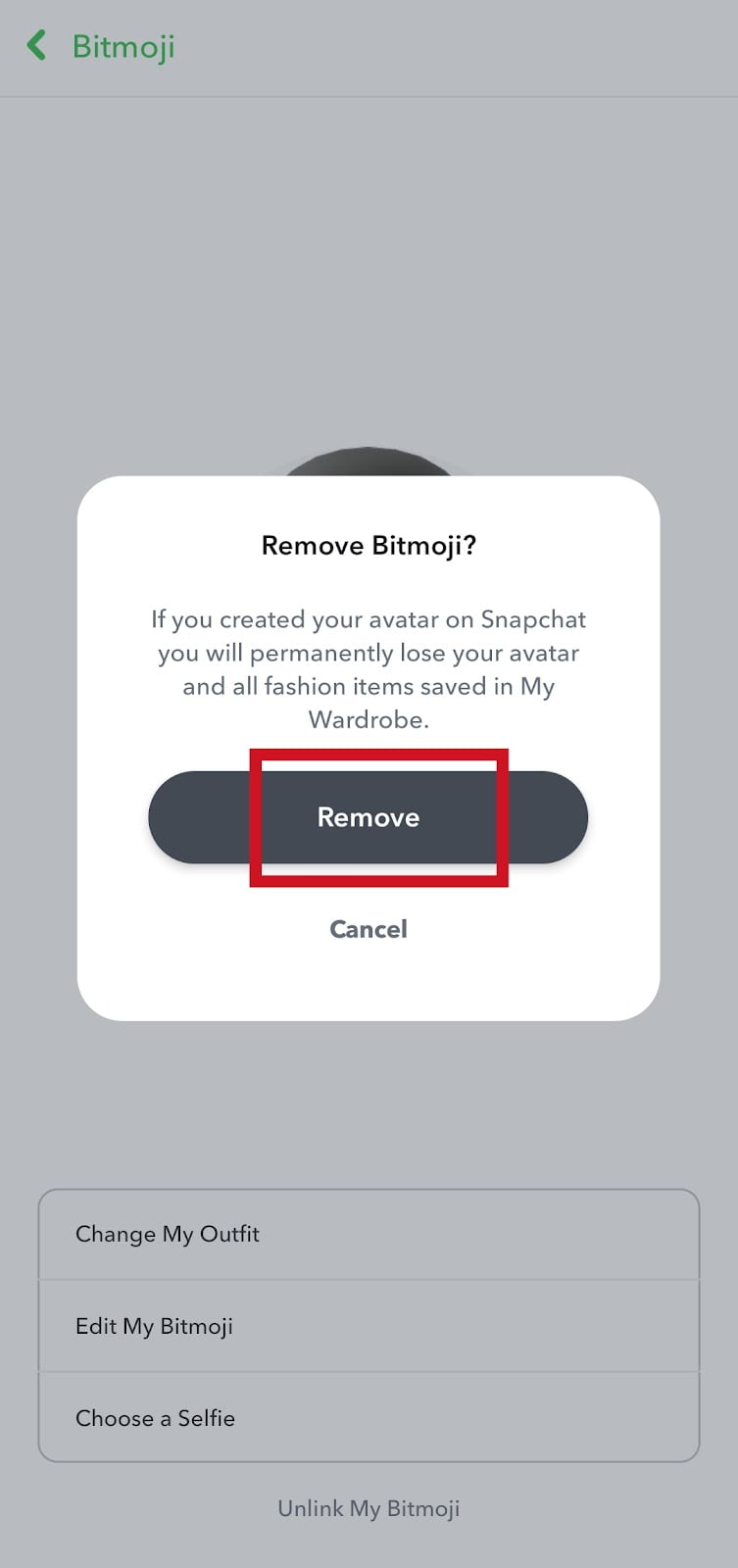
- Tap remove to unlink your Bitmoji avatar.
- Once you’ve successfully unlinked your Bitmoji. To create a new Bitmoji avatar, tap on Create My avatar
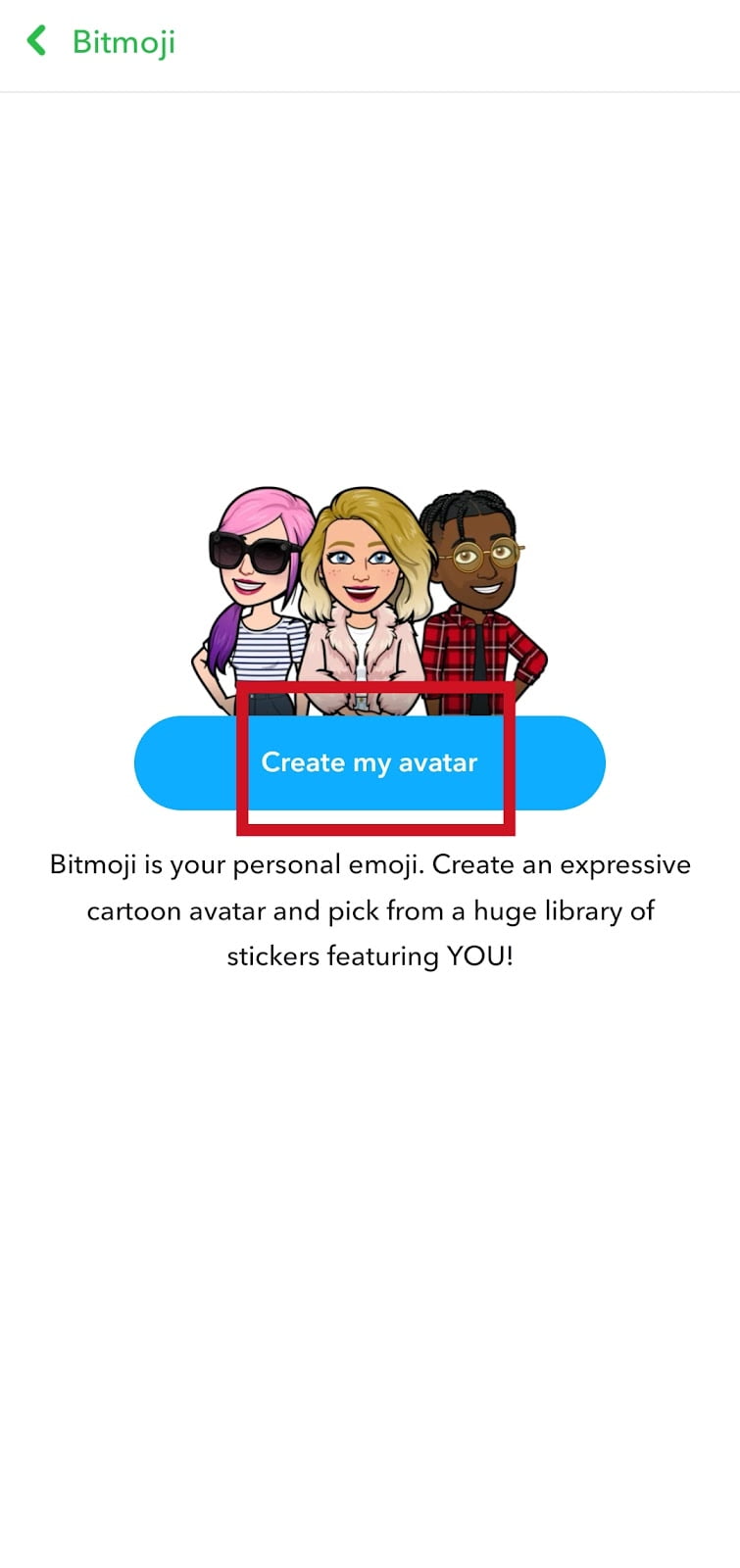
- Select the new gender you want to use on Snapchat

- Now that you have selected a new gender, you can start to redesign your avatar from scratch.
- Tap Save once you’re done choosing your preference
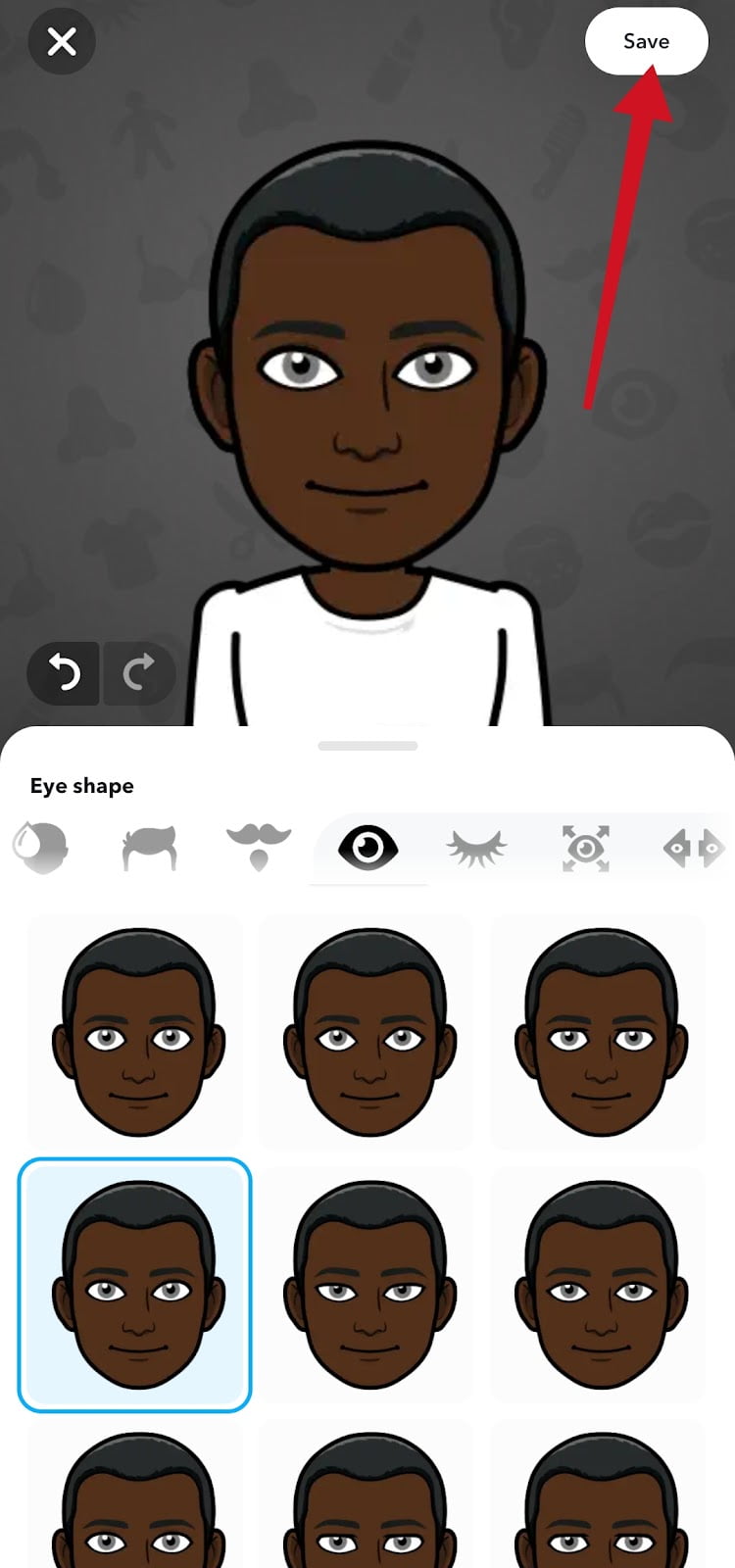
- Select an outfit for your Bitmoji Avatar. And tap Save
- Now, go to your profile dashboard to change your background & poses, and selfie.
If you created your Bitmoji avatar yourself on Snapchat, unlinking it will remove and permanently delete the custom modifications you’ve on your current Bitmoji. This also includes all the fashion items that are saved in “My Wardrobe” on Snapchat.
Whenever you decide to go back to the original Bitmoji gender, you will have to redesign your avatar from scratch again. If you don’t want to use the default Snapchat Bitmoji avatar, then you need to redesign the avatar, outfit, poses, background and selfie.
Also Read: What Does Pending On Snapchat Mean?
How to Change Bitmoji Avatar on Snapchat
- Go back to your Snapchat account
- Tap the Bitmoji icon to go to the account dashboard
- Tap your Bitmoji avatar on your profile dashboard
- Swipe up and tap Edit Avatar
- Now select the avatar you want to use.
- Tap Save
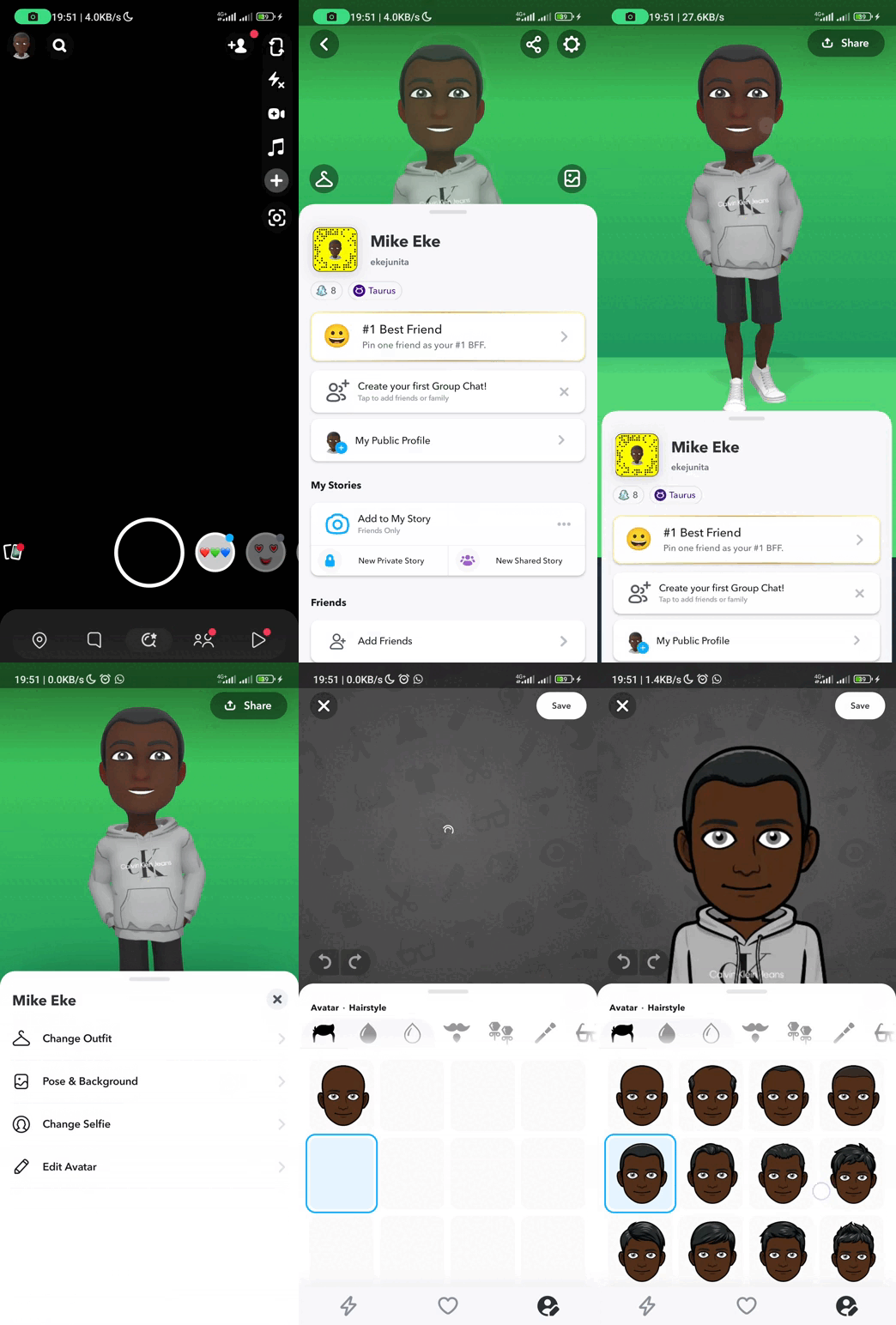
How to Change Bitmoji Poses and Background on Snapchat
- Open Snapchat
- Tap the Bitmoji icon to go to the account dashboard
- Tap your Bitmoji avatar on your profile dashboard
- Swipe up and select Poses & Background
- Choose the background and select your preferred pose.
- Tap Save.
Access to backgrounds for your Snapchat Bitmoji profile is limited if you’re using free Snapchat. To get full access to all the available backgrounds you have to subscribe to Snapchat+.
How to change Bitmoji outfit on Snapchat
- Tap your Bitmoji icon.
- Tap the Bitmoji avatar on your profile
- Swipe up and tap Change outfit
- Check all the available Bitmoji fashion and choose your outfit.
- If you want to change the colour of your outfit. Tap on the colour palette icon and choose a colour for your outfit.
- Tap Save.
How to change Bitmoji selfie on Snapchat
Open Snapchat »»» Bitmoji icon »»» Bitmoji avatar on your profile dashboard »»» Swipe up and tap Change Selfie »»» Choose a selfie and »»» tap Done.
While editing your Bitmoji avatar, there are other add-ons and accessories you can use to modify your avatar appearance until you create your look-alike.
Top Bitmoji Features on Snapchat
There are some other features and preferences attached to Snapchat Bitmoji that you can use to create an avatar of your choice.
Bitmoji Deluxe
You can use Bitmoji Deluxe to create even more realistic and customizable Bitmojis. Bitmoji Deluxe will give you access to customizable tools like:
- Different Hairstyles, hair colour and treatments
- Facial hair and hair colour
- Earrings pairs (both right and left)
- Facial piercing
- Glasses (different types)
- Makeups kits
- Skin tone, body type and other customizable Bitmoji deluxe features.
How To Change Bitmoji Gender On The Bitmoji App
The only way to change Bitmoji’s gender on the Bitmoji app is to reset the Bitmoji avatar.
- Open Bitmoji app
- Tap settings, the gear icon top right corner of the screen
- Tap My Data
- Tap Reset Avatar
- Tap OK to reset the avatar and create a new one from scratch.
But can help you create a striking resemblance to the Bitmoji avatar of you. On creating a new avatar you will be asked to take a selfie of yourself on the Bitmoji app to make yourself and your Bitmoji avatar look identical.
Also Read: Can I Have 2 Snapchat Accounts With The Same Phone Number?
Bitmoji Classic and Bitstrips
Bitmoji classic and Bitstrips are two of the oldest styles of Bitmoji with fewer customizable options. Bitstrips and classics have been discontinued in 2023 but users who enabled it before it was removed can still use it.
If you are looking for a more cartoony and customizable Bitmoji avatar, then Bitmoji Classic is a good option.
As of now, if you are using Bitmoji Classic and Bitstrips styles, you won’t be able to restore Bitmoji Classic and Bitstrips if you reset your avatar.
Conclusion
If you decide to change your Bitmoji gender on Snapchat, you can always do that at any time. Just follow the steps in this article.
You can always change back to the original Bitmoji gender. All you need to do is follow the steps to create a new Bitmoji with the original gender.
First, you unlink the current Bitmoji and when creating a new Bitmoji you then choose the original gender.
You can always edit your Bitmoji avatar, background and poses, outfits, selfies and add other custom modifications.
Frequently Asked Questions
Can I change my Bitmoji gender without unlinking it?
No, you can’t change your Snapchat Bitmoji gender without unlinking it. Before you can change your Bitmoji gender, you need to unlink the existing one to be able to create a new Bitmoji with another gender.
Can I change my Bitmoji gender back to the original?
Yes, you can change your Bitmoji gender to the original anytime. You need to unlink the current gender first. Then create a new Bitmoji with the original gender.
Can I change gender on Bitmoji App?
Yes, you can change the gender on the Bitmoji app but you will have to reset the current avatar to change the gender on Bitmoji.
Note: Once you reset your Bitmoji avatar you will lose all the custom modifications you made on your avatar.
Can I use Bitmoji without Snapchat?
Yes, but you will need to sign up with your email address if you don’t have a Snapchat account.
FURTHER READING
- How To Contact Snapchat Support 2023 (3 Easy Ways)
- How To Hide Snapchat Score [The Only Way]
- What Does “Recents” Mean On Snapchat?
- 6 Ways To Add Random People On Snapchat
