


Deleting an Instagram account is a straightforward process, but it typically requires a user to have access to their account’s password. However, if you’ve forgotten your password or no longer have access to the email address or phone number associated with your account, deleting it can be a bit more tricky.
In this article, we will discuss the steps to delete an Instagram account and provide helpful tips for users who may be facing this issue. Whether you want to take a break from social media or close your account permanently, this guide will help you navigate the process.
Deleting your Instagram account will make you lose all photos, followers, videos and anything relating to your Instagram profile. So you might want to download a copy of the Instagram data (your user information). These measures are taken because the action can’t be undone. If you have the tendency you might need this account for the latter you can just deactivate the account temporarily.
How to Delete Instagram Account
To be on the safer side, use the download data tool to download a copy of your information on Instagram.
- To delete your Instagram account, if you are using an Android phone, iOS or PC, you will need to log in to your account through a web browser in other to complete this process.
- Click this link, once you are on the delete Instagram account page, you will need to enter the reasons why you want to delete the account. Then, select the reason.
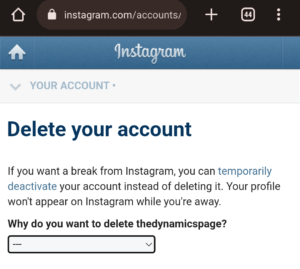
- Now that you selected the reason. Enter your password and click on delete + username to proceed.
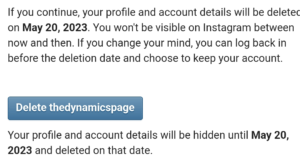
After your account has been deleted, you can sign up again with the same username or add that username to another account as long as it hasn’t been taken by a new user on Instagram.
How long will take before Instagram delete my account?
Also, be aware that your Instagram account and information will permanently be removed from Meta’s database after 30 days. Although, the deletion process takes about 90 days to complete.
How to deactivate your Instagram account
Your account, photos, videos, and comments will be hidden if you temporarily deactivate your Instagram account. You can reactivate it and login back into the account anything so far you still have the password to the account.
You can deactivate your account with a PC web, or mobile browser, but can only go through the temporal deactivation process on the Instagram app if you’re using iPhone.
- Go to your mobile browser and log in to Instagram Web.
- Click on the profile icon. Then, tap the edit profile on your Instagram menu dashboard.
- Navigate and scroll down, then you need to click on the temporarily deactivate my account.
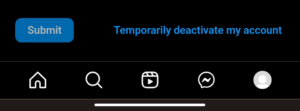
- Once you are on the deactivate page, you need to select the reason why you want to deactivate your account. Then enter your password to deactivate the account.
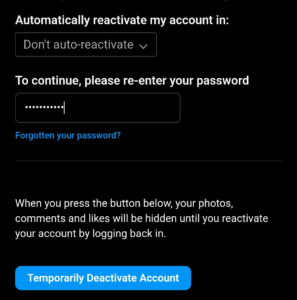
If you don’t use Instagram automatically reactivate your account within a max period of time, which is usually 7 days. This means that your account will be visible again on Instagram after this period. If you don’t want this, you can select the don’t auto-reactivate option.
With this article, you can now delete your account permanently or temporarily deactivate it. All you need to do is just to follow all the steps and instructions written in the guide.
