


Have you decided to say goodbye to Kik for good? Maybe you’re switching to a new messaging app, or you’re just ready to disconnect from the platform. Whatever your reason may be, deleting your Kik account permanently can be a bit tricky. In this article, we’ll guide you step-by-step through the process of deleting your Kik account for good.
By the end of this guide, you will be able to permanently delete your Kik account, with the knowledge that the platform has erased all of your personal information.
How to Temporarily Deactivate Kik Account
To deactivate your account temporarily on Kik you have to go to the Kik temporary deactivation website on a web browser.
STEP 1: Kik Deactivation Website
Click the link above to go to the Kik deactivation website.
STEP 2: Enter Kik Registered Email Address
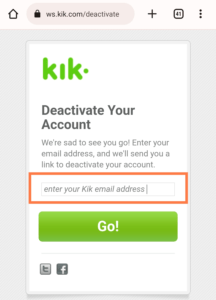
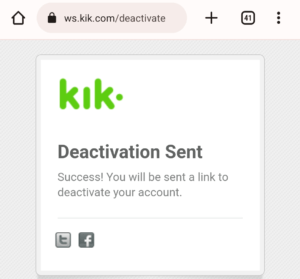
Enter your Kik email address and click on go. Once it shows Deactivation Sent. Then, check your email address and use the deactivation link Kik sent to deactivate your account.
STEP 3: Temporary Deactivate Kik Account
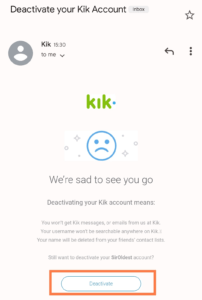
Check your email, open the Kik email and click on deactivate.
Now, you have to select the reasons why you’re deactivating your account. You can check any of the options or if you have any other personal reasons, write them in the text field.
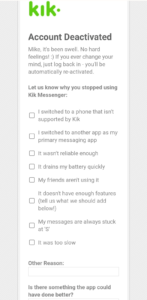
To access the signup/login page on Kik, go to your mobile and tap to open the app, as Kik has temporarily deactivated your account.
Read also: Changed Password But Still Can’t Login? How to Fix Login Issues on Kik
How to Delete Kik Account Permanently
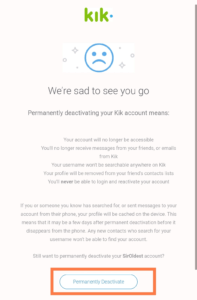
Permanently deactivating your account means:
- Your account is no longer accessible
- You’ll no longer receive Kik messages or emails from Kik
- Your username won’t be searchable anywhere on Kik
STEP 1: Kik Permanent Deactivate website
Click the link to go to the permanent deactivation website.
STEP 2: Delete your Kik Account Permanently
Now fill in your Kik username information to be able to delete the account from Kik. You need to remember your Kik username and email to be able to continue with the deactivation process.
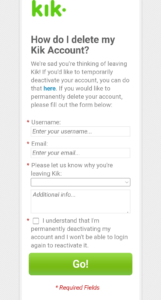
Now, check your mail inbox and click on the permanent deactivation link to delete your Kik account
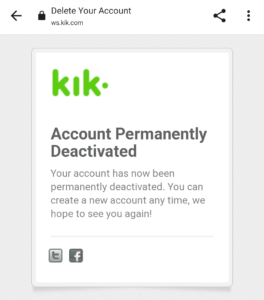
How long will my Kik account take to deactivate?
Once you have deactivated your account on Kik Messenger. Your data will be removed from Kik servers within a few hours. Once your account has been deleted, you won’t be able to recover your account. The only thing you can do is create a new account.
Can I Reactivate my Kik Account?
YES, you can reactivate your Kik account only when its temporarily deactivated. All you need to do is just to download the app and login with your registered email address. You can always reset your password if forgotten.
Does Kik Delete Unused Accounts?
Kik does not delete accounts that have not been used in a very long time. You can log in back to your account even if you haven’t used it in years. You can still login back if you temporarily deactivated the account. All you need to do is login in with your email and password and the account will be reactivated.
Can I Delete Or Deactivate My Kik Account Without Email?
There is no possible way to deactivate your Kik account without your email address. If you no longer remember your Kik email account, you will need to contact the Kik support centre for help.
