Close Menu
  • Social Media
    • Facebook
    • Instagram
    • Snapchat
    • TikTok
    • X (Twitter)
  • Messaging
    • Kik
    • Messenger
    • Telegram
    • WhatsApp
  • Android
  • Browsers
Facebook X (Twitter) Instagram
TechfybaTechfyba
  • Social Media
    • Facebook
    • Instagram
    • Snapchat
    • TikTok
    • X (Twitter)
  • Messaging
    • Kik
    • Messenger
    • Telegram
    • WhatsApp
  • Android
  • Browsers
TechfybaTechfyba
Home » How To Change Your Facebook Name On Instagram
Facebook

How To Change Your Facebook Name On Instagram

In today's How-to guide, we will walk you through how you can change your Facebook account name and username through Instagram.
Khael EkeBy Khael EkeUpdated:29 May 20233 Mins Read
Facebook Twitter Pinterest Telegram LinkedIn Tumblr WhatsApp Email
How To Change Your Facebook Name On Instagram
Share
Facebook Twitter LinkedIn Pinterest Telegram Email

If you’re looking to change your Facebook name on Instagram, you’ve come to the right place. Instagram allows users to connect their Facebook account to their Instagram account, which means that your Facebook name and profile picture will appear on your Instagram account by default. 

However, you can easily change your Facebook name on Instagram if you want to use a different name on the platform. In this article, we’ll provide you with a step-by-step guide on how to change your Facebook name on Instagram.

Facebook has become easier and easier to navigate every day. You can eventually change almost any settings on your Facebook, Messenger and Instagram apps if you have them connected together. 

Table of Contents

Toggle
  • What is Meta Account Centre Page?
  • How to change your Facebook name on Instagram without a password 
  • Will Facebook password be required?

What is Meta Account Centre Page?

The Meta account centre page is where you manage and oversee all your accounts, profiles, and how you share your content to all your accounts across Meta Technologies. You can also add or remove an account on the accounts centre page. 

How to change your Facebook name on Instagram without a password 

If you had your Facebook, Instagram, WhatsApp and all your meta account and added them to the same account centre you will be able to manage them whether it’s on Facebook or Instagram. 

You should also be aware that if you change your Facebook name, you can’t change it back in a period of 60 days, which is two months. Let’s dive into it.

  1. Open and login to your Instagram account. Click on the “Profile Image Icon” to enter the profile dashboard page. On the profile, dashboard click on the navigation menu icon. 

How To Change Your Facebook Name On Instagram
Change Your Facebook Name On Instagram
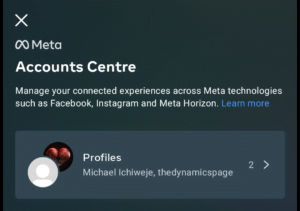
  1. Secondly, click on “Settings”. Once it takes you to the settings page scroll and click on “Account Centre” 

Account Centre
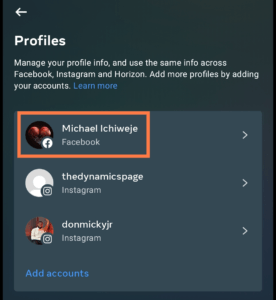
  1. Under the account centre page, click on “Profiles“. You will see the option to select your accounts across Meta. Click on your Facebook account to edit name. 
Change Your Facebook Name On Instagram
Change Your Facebook Name

You can change your Facebook name, username and current profile picture on the Accounts Centre. Select the name option and type in your preferred name. Click on Preview your new name and select how you want the name to appear on Facebook. 

Will Facebook password be required?

Your Facebook account password won’t be required to change your account from Instagram. You will have to enter your password before you can save any changes on Facebook. Once these changes are made, they cannot be undone until after 60 days. 

With this guide, you will be able to manage all your accounts across Meta. Just follow the guides in this article to set up these changes. 

Was this article helpful?
YesNo
Facebook Instagram Social Media
Share. Facebook Twitter Pinterest LinkedIn Tumblr Email
Khael Eke
  • Website
  • X (Twitter)
  • Instagram
  • LinkedIn

Khael Eke is an experienced writer and blogger in the field of consumer technology with over 4 years of hands-on experience. He has been an editor at Techfyba.com from the outset and his focus and key interests are Android, Xiaomi products, Social Media applications, iOS and accessibility as well as consumer technology in general. Mike's articles will provide you with the practical solutions, knowledge and tools you need to stay ahead in the ever-evolving world of technology.

RECOMMEDNED

Switch From TikTok Personal To Business Account In 2026

0

How To Add A Linktree Link To TikTok 2026

What Does “TY” Mean On Snapchat?

Latest News

Switch From TikTok Personal To Business Account In 2026

How To Add A Linktree Link To TikTok 2026

What Does “TY” Mean On Snapchat?

How To Hide Followers And Following on Instagram 2025 (3 Ways To Do It)

Facebook X (Twitter) Instagram Pinterest
  • About Us
  • Contact Us
  • Privacy Policy
  • Terms and Conditions
  • Cookie Policy
© 2026 Techfyba. All right reserved.

Type above and press Enter to search. Press Esc to cancel.