

If you are an avid Instagram user and suddenly notice that a friend or follower has disappeared from your follower list or their profile page no longer exists, it could be a sign that they have blocked you.
Instagram doesn’t notify users when they’ve been blocked, which often leaves users uncertain of how to identify who has blocked them. In this article, we will help you figure out who has blocked you on Instagram.
How To See Who Blocked You On Instagram
If you have been seeing someone’s posts and you follow them on Instagram. Suddenly, their posts just disappeared from your feeds, it’s either they no longer use Instagram or it’s what you are thinking (they’ve blocked you)
- The first is to carry out a little experiment if you have multiple Instagram accounts. Or just type their name on Instagram to know. Don’t worry we’ll show you in a few steps
STEP 1: Go to Instagram Profile
Go to your Instagram account profile, switch your other account, search for your name and block yourself.
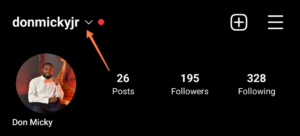
Once you have switched to your other Instagram account, click on followers and search for your other account….

Click on the profile picture to go to the profile account dashboard. Then, click on the 3 dots.
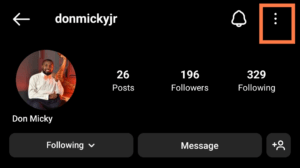
STEP 2: Block Account
Select the block option to block the user.
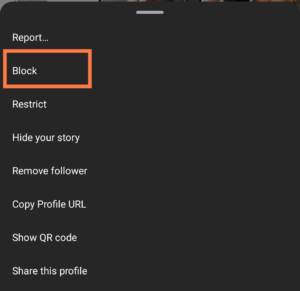
Now, select how you want to block the account and tap on block.
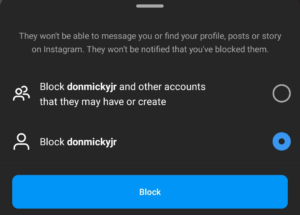
If you pay attention, you’ll notice that Instagram doesn’t send you a notification when someone you follow blocks your account.
RELATED POSTS
STEP 3: Search user’s name
Now, switch back to your account, and search for the account name. This is what the profile dashboard will look like.
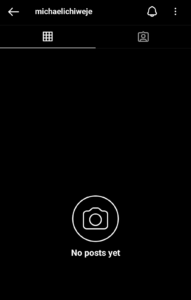
The easiest method is to search for the user’s name. And if it shows “No posts yet“. It means your account has been blocked.
Blocking someone might but, unblocking someone it’s not. Learn how to unblock someone on Instagram.
Ask a friend to see if they can find the account
To see if someone has indeed blocked you on Instagram. when you’re not able to see any of their posts, follow them, or view their profile.
Ask a mutual friend to check whether they can see the person’s posts. If you suspect that you have been blocked, taking these steps can help you to confirm your suspicions.
It’s important to approach the situation calmly and respectfully, as the person may have chosen to block you for a variety of reasons. Remember to respect their decision and avoid harassing or contacting them if they have chosen to cut off communication.
One possibility is that the person you are searching for has actually deleted their Instagram account. If this is the case, you will not be able to find any posts associated with their name, and you will not be able to follow them or view their profile.
You may want to try searching for the person on other social media platforms or reaching out to them via other means to confirm whether they have deleted their account.
Another possibility is that the person has simply changed their username or handle on Instagram.
What happens when someone blocks you on Instagram?
Instagram will remove all your comments, likes, and mentions on the user’s post.
You won’t see their post if they go live on Instagram
You will be able to message or mention them.
The messages you sent won’t be delivered,
They will still be able to see your posts if you’re on the same group on Instagram.
Conclusion
If you have been wondering how to see who blocked you on Instagram, now you know the steps to take.
We hope that this guide has been helpful to you, and if you ever find yourself in need of unblocking someone on Instagram, we have a guide for that too. Keep enjoying Instagram, and remember to always use the platform respectfully.
