


Are you tired of Facebook’s videos automatically playing as you scroll through your feed? Well, there are ways to stop them. Autoplay videos can be frustrating and consume your data unnecessarily. This can be not only distracting but also consume unnecessary data and impact the user experience. If you’re looking for a way to disable autoplay videos on Facebook feeds, there are several methods available. In this article, we’ll show you how to disable autoplay videos on Facebook feeds so you can have a better browsing experience.
How to Disable Autoplay Videos on Facebook Feeds
We will be exploring two (2) methods on steps to disabling Facebook autoplay videos. Let’s get started.
Method 1 of 2
STEP 1: Locate and open the Facebook app
Firstly, you need to open the Facebook app on your phone. Once you are on your home Facebook feeds, then swipe left to go to Facebook video feeds or tap the Video icon to switch to videos feeds.
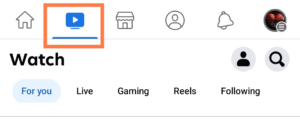
STEP 2: Profile avatar icon
Now, click on the avatar icon below your Facebook profile picture to go to Your Watch page.
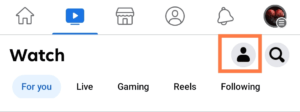
STEP 3: Mobile data usage
Navigate to Autoplay options where you have On mobile and WiFi. Now to change this option, tap the Never Autoplay Videos to change the settings.
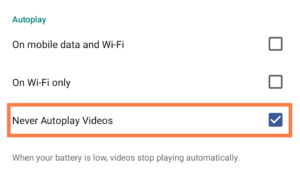
This is quite the easiest and quickest method to disable autoplay videos on Facebook.
RELATED ARTICLES:
- How to Turn On Facebook Profile Picture Guard
- How to Autosave Media on Facebook Messenger
- How To Turn On/off Active Status on Facebook Messenger
Method 2 of 2
STEP 1: Menu Dashboard
Once you opened the Facebook app. Tap on the profile picture icon on the top right corner in the app to go to the menu dashboard.
STEP 2: Settings and Privacy
Scroll down and click on settings and privacy. Then, tap on the settings option.
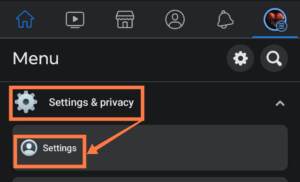
STEP 3: Preference and media
Got to preference to customize your experience on Facebook. Under preference category. Click on Media to disable autoplay videos on Facebook.
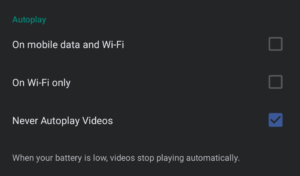
Note: If you have done any of the above methods, you don’t have to repeat it again with the other method. Any other methods work fine.
Turning off Facebook autoplay videos will give you authority to control your data usage on Facebook. Once this feature is turned off, you will have to click to watch a video while scrolling down through Facebook newsfeed.
Conclusion
To conclude, disabling autoplay videos on Facebook can improve your browsing experience. You can do this in two easy steps: Navigate to Autoplay options in the Facebook app or access your account settings and preferences. By disabling autoplay videos, you can save data and avoid distractions.
Frequently Asked Questions
How Do I Disable Autoplay Videos on Facebook Feeds?
Autoplay Facebook newsfeed videos can consume a lot of your data. If you want to stop. Open Facebook App »»» Three horizontal lines »»» menu dashboard »»» settings & privacy »»» settings »»» media »»» never autoplay videos.
How Do I Change The Privacy Settings Of My Facebook Posts And Videos?
Facebook allow it’s user to restrict people who can see your post. Just like updating your profile picture without notifying and changing the settings to only me. This Facebook feature allows it’s users to change their audience in any of their posts or videos.
Aside from settings your post to only me, Facebook has lots of other privacy feature. This includes hiding your posts, turning on Facebook profile picture guard etc.
How Do I Disable Autoplay Facebook Newsfeed Videos On My iPhone
Open the Facebook app on your iPhone. »»» Tap the three lines in the bottom right corner of the screen »»» Settings & privacy »»» Media and Contacts »»» Videos and Photos »»» Never Autoplay Videos.
