

Have you ever been so busy that you want a break from your phone and focus on your work?
And you want to enable do not disturb your phone. But you have no idea if the alarm you set will go off if you put your phone on do not disturb mode.
Do Not Disturb (DND) is a handy feature that silences all notifications and calls, so you can focus on work. But what about your alarm? Will it still go off if DND is turned on?
In this article, you will learn whether your alarm will go off in do not disturb mode. And also how to enable Do not disturb on Android and iPhone devices.
Will My Alarm Go Off In Do Not Disturb?
The answer is YES. Your alarm will go off when it’s on do not disturb mode, and even when your phone is powered off. Alarms are designed to automatically power on your phone when it’s shut down.
But, there are built-in settings on Android that allow users to disable shutdown alarms, and when it’s on do not disturb mode. Sometimes these settings depend on your phone operating system.
For both iPhone and Android users, regardless of whether your phone is silent, do not disturb your phone’s alarms are designed to go off.
Also Read: How To Fix Xiaomi Phones Network Problem
Why Did My Alarm Not Go Off In Do Not Disturb Mode?
There are some reasons why your alarm did not go off in do not disturb mode. These are the few things you need to check if your alarm did not go off.
The Alarm volume was low
If your alarm is not high, you won’t be able to here the alarm ring when it goes off. Usually people makes mistakes when regulating the alarm volume. You need to always check the alarm volume after setting the alarm.
Date, Time, AM and pM was Not Set Correctly
Another reason your alarm did not go off in do not disturb mode is you probably set the wrong date and time. If the alarm was set properly at the right date but the wrong time. It go off at the you intended it to go off.
Sometimes people make mistakes while selecting the AM or PM when setting the alarm. After setting the alarm, you need to crosscheck if the date, time, AM or PM you intended for the alarm to go off is right.
Alarm Ring tone is too low
If you have a ring tone with low sound, even if the volume is set to highest, it will have an impact on the alarm when it goes off. So, you need to change your alarm ring tone to another with a better sound.
Alarm Was Disabled
This depends on the Android device and the OS of the device you’re using. Android devices like Samsung have options on DND to turn off alarms and media sound. So if you’re using a Samsung phone and your alarm didn’t go off when do not disturb is enabled, this means that the alarm was toggled off on the DND settings.
But if the alarm appears to be off, continue reading, you will learn how to enable the alarm on DND settings (on Samsung phones).
What happens When My Phone Is In Do Not Disturb mode?
Do not disturb mode will mute all notifications for incoming calls, messages and all your third-party apps. So you need to know that the do not disturb mode is not intended to stop your phone’s alarm.
So, with do not disturb mode, you can silence sound, vibrations, block visual disturbances, in-app notifications.
Does Do Not Disturb Turn Off Alarms on Samsung?
YES IT DOES. Like I mentioned before, we all know that Samsung is not like any other Android device. So there are options to mute certain features, including alarms on DND settings.
Samsung devices not only silent calls, messages and app notifications, but they also have options to not allow alarm media sound. So, if you’re a Samsung user and your alarm didn’t go off after your alarm because your phone is on DND. You need to enable the alarm options on your do-not-disturb settings.
How To Turn On Alarm On Samsung In DND Mode
- Open the Settings App on your phone.
- Scroll down and tap Notifications to open the tab.
- Tap on Do Not Disturb
- The next thing you need to do is click on Alarms and Sounds.
- Now, toggle on the option to allow your alarm to go off.
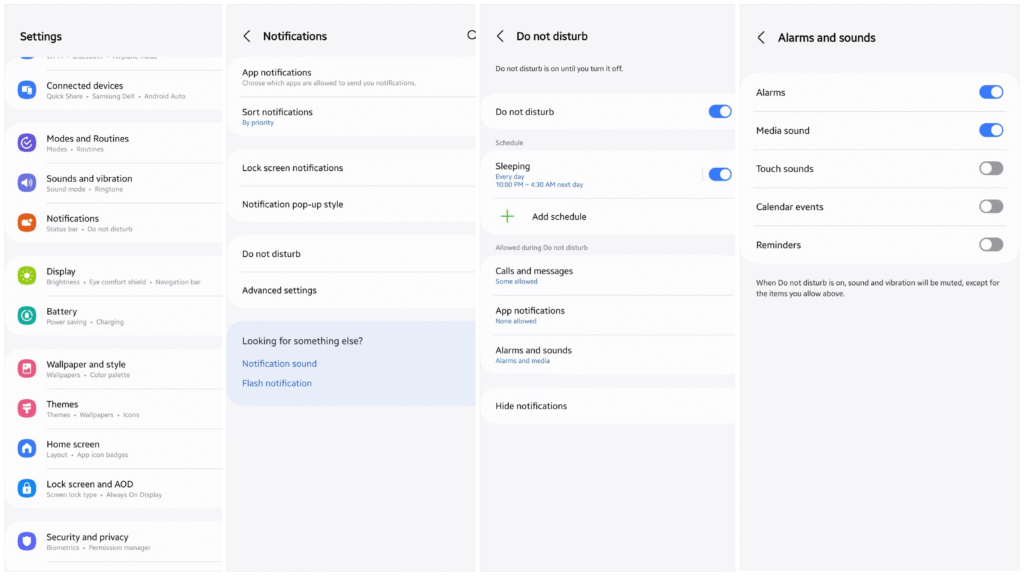
Aside these settings, always make sure that your device alarm volume is turn up.
How to Enable And Disable Do Not Disturb On Android
Using Notification Panel or Control Centre
In some Android phones, both notifications and the control centre appear on the same screen.
While on others like Xiaomi phones, notifications appear on the left and control centre on the right side of the screen.
- Swipe down to the notification panel
- Tap Do not disturb with the crescent moon icon. If you do not see it, swipe right
- You can toggle it off by swiping down. The tap “DND”
Using Settings
- Tap the settings app on your phone
- Scroll down. Tap Sound & Vibration
- Look for Do Not Disturb.
- Toggle the button to turn it on and off.
In Android phones, you can schedule a start and end time when you enable do not disturb on your phone. You can also set the option to repeat every day.
Also Read: How To Remove Ads On Xiaomi Phones
How to Enable And Disable Do Not Disturb On iPhone
Enable Do Not disturb on iPhone Using Control Center
- Swipe down from the top-right corner of your screen to open the Control Centre.
- Press and hold the focus (crescent moon) icon.
- Select Do Not Disturb to turn on and you can still turn it off also.
Enable Do Not disturb on iPhone Using Settings
- Open the Settings app.
- Tap on Do Not Disturb.
- Toggle the switch on or off.
When Do not disturb is enabled on iPhone, incoming calls, messages and notifications will be silenced. However, alarms will still go off. You can also choose to allow certain calls or notifications to come through, even when Do Not Disturb is enabled.
Frequently Asked Questions
Will My Alarm Still Go Off On Not Disturb?
Yes, your alarm will go off in any mode you set your phone on. Alarms are designed to go off, when your phone is off, do not disturb, silence.
Does Alarm Still Work With Do Not Disturb Android?
Yes, the alarm will even when you enable the do not disturb mode on Android.
Will The Alarm Go Off When My Phone Shut Down?
Yes, your alarm will still go off when your phone is off. But Android users are allowed to enable or disable shutdown alarms.
What If The Alarm Doesn’t Ring Out?
If the Alarm went off, but didn’t ring out. Firstly, check your alarm ring tone and see if it’s set. Secondly, check your alarm ringer volume to see whether it’s off. So make sure you turn it all up so you can hear the ring tone when the alarm goes off.
FURTHER READING
- How to Change Xiaomi Control Centre Style
- How To Create A WhatsApp Community
- How To Add Or Remove Groups In WhatsApp Community
